Backtesting Engine
Verify your trading ideas,before risking real capital
Build entry and exit rules with no-code indicators, simulate position sizing, and run strategy backtests against historical NSE & BSE price data with realistic Indian brokerage and tax simulations.
Requires WickLog Pro · Backtest daily & intraday timeframes · Up to 5 years history
No-code strategy builder
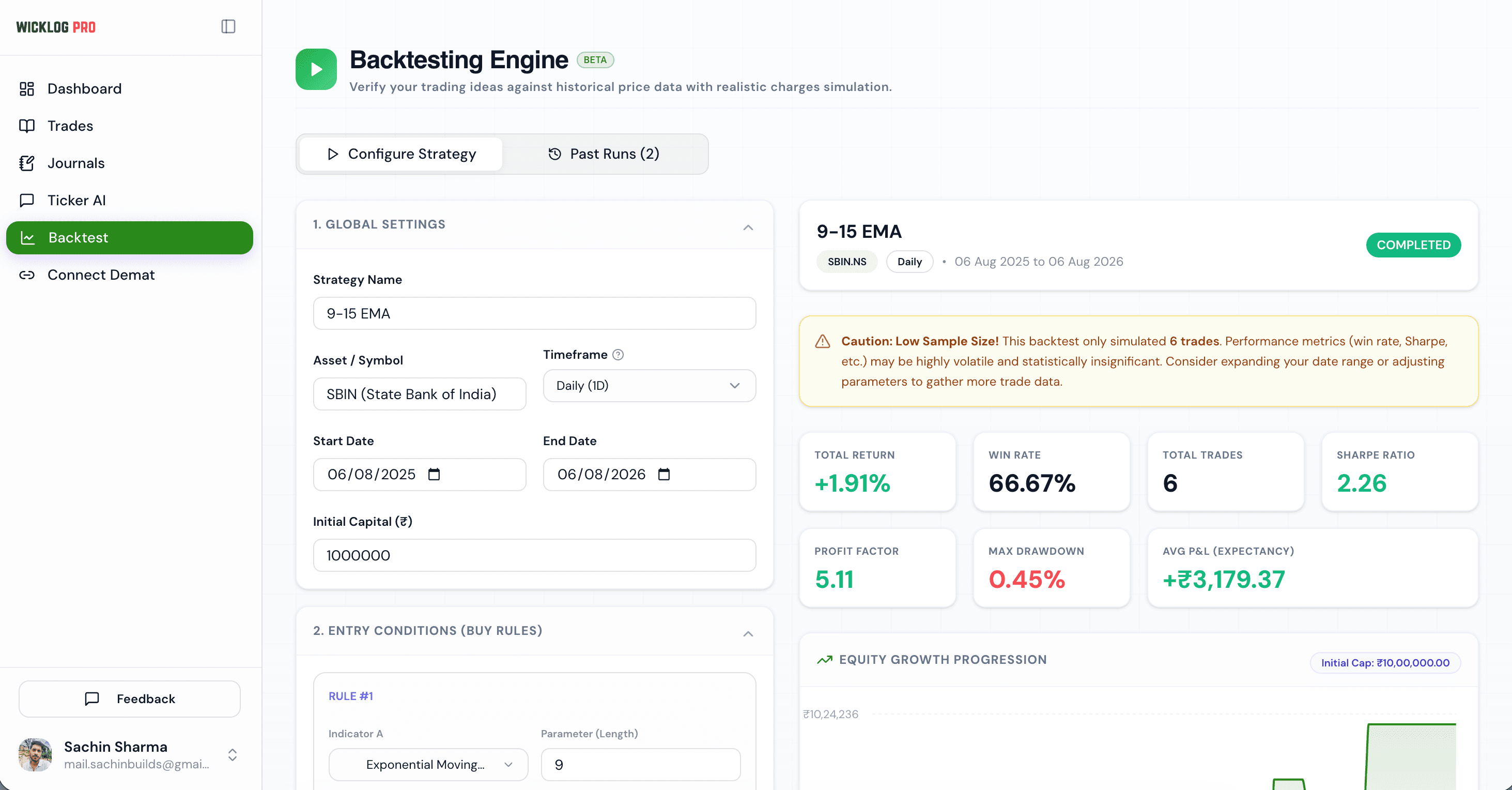
You don't need to write Pine Script or Python to verify your trading ideas. WickLog's intuitive, no-code strategy builder lets you construct complex rules by selecting indicators, comparison operators, and values from dropdowns.
Whether you're trading a simple EMA crossover or combining multiple indicators like RSI, MACD and Supertrend with custom thresholds, you can map your entry conditions visually in under a minute.
Technical indicators
Create rules from 28 indicators, including SMA, EMA, Bollinger Bands, RSI, MACD, Stochastic, Supertrend, ADX, ATR, VWAP, volume, and breakouts of recent highs and lows.
Crossover operators
Set conditions for 'Crosses Above' and 'Crosses Below' to catch trend breakouts, or use standard math operators like '>' and '<'.
Multi-indicator comparisons
Compare an indicator against a constant value (e.g., RSI < 30) or directly against another indicator (e.g., EMA 9 crosses above EMA 15).
Logical rule nesting
Combine multiple filter criteria using AND/OR operators to refine your entry and exit triggers.
Realistic charges & brokerage simulation
A strategy that looks highly profitable on paper can easily bleed to death from transaction fees, especially when trading high-frequency options or intraday setups in India. Most backtesters ignore brokerage and taxes — WickLog does not.
Our simulator replicates the exact charges logic of top Indian brokers like Zerodha and Groww, including brokerage, STT, exchange transaction charges, SEBI turnover fees, GST (18% on fees), and stamp duty. You see your true net profits.
Brokerage calculation
Accurately calculates flat per-trade charges or percentage-based brokerage for both delivery and intraday equity/F&O.
Securities Transaction Tax (STT)
Accounts for STT, the highest transaction tax for Indian traders, which differs significantly between buy/sell sides and intraday vs delivery.
GST & regulatory levies
Factors in SEBI turnover charges, GST on brokerage + exchange transaction fees, and state-wise stamp duties.
Net P&L transparency
Every backtest shows gross P&L alongside simulated charges and Net P&L so you know what you would actually keep.
Advanced exit controls & sizing
A strategy is only as good as its risk management. WickLog gives you granular control over how your simulated trades manage risk, how positions are sized, and how exits are triggered when the market turns.
Scale your position sizes dynamically based on your initial capital, and protect your downside using automated stop losses and take profit targets.
Flexible position sizing
Choose between Fixed Quantity (sizing by a constant number of shares/contracts) or Fixed Capital Percentage (position size scaled to a percentage of total capital).
Percentage stop loss
Define your maximum risk per trade with an automatic percentage-based stop loss that exits the trade when hit.
Profit targets
Lock in gains automatically with percentage-based profit targets (take profit limits).
Opposite crossover exit
Trigger early exits when entry rules reverse (e.g., exiting a long trade immediately when EMA 9 crosses below EMA 15).
Rich analytics reports & trade logs
WickLog generates a comprehensive, audit-ready performance report for every backtest. Analyse the statistical edge of your setup with institutional-grade metrics, and review the exact list of simulated executions.
We also build a caution warning system that automatically alerts you if your backtest has a low sample size or high volatility, helping you avoid curve-fitting trap setups.
Key Performance Indicators (KPIs)
Net Return (%), Win Rate (%), Total Trades, Sharpe Ratio, Profit Factor, Max Drawdown (%), and Average P&L Expectancy.
Interactive equity curve
See a visual plot of your account balance progression over the test period to check if returns are steady or erratic.
Simulated trade logs
View the buy/sell date, entry/exit price, size, gross P&L, fees breakdown, and net profit for every single simulated trade.
Low sample size alerts
Get notified if a backtest has too few trades to be statistically significant, preventing false confidence.
Frequently asked questions
Is the WickLog backtesting engine free?
No, the Backtesting Engine is a premium feature available exclusively on our Pro plan. It supports historical strategy testing across daily and intraday timeframes so you can validate your edge before risking real capital.
What technical indicators can I backtest?
You can build strategy rules from 28 indicators: price, volume and VWAP; moving averages (SMA, EMA, WMA) and Bollinger Bands; momentum (RSI, MACD, Stochastic, CCI, Williams %R, MFI, rate of change); trend and volatility (Supertrend, ADX, ATR); and n-bar highs and lows for breakouts. Each takes a single length setting, with standard values for the rest (e.g. MACD 12/26/9).
Does the simulator account for brokerage and taxes in India?
Yes, this is one of our key features. It simulates exact Zerodha and Groww style charges including flat/percentage brokerage, STT, Exchange transaction charges, GST, SEBI turnover fees, and stamp duty.
What symbols/assets are supported?
You can backtest strategies on major Indian stocks (e.g. HDFC Bank, ICICI Bank, SBIN, Reliance) and indexes including the Nifty 50 and Nifty Bank indices.
What are the limits on intraday backtesting?
Intraday backtesting (15-minute and 1-hour intervals) requires a Pro plan. Additionally, intraday backtests are limited to a maximum of 60 days of historical data to ensure high-fidelity calculations.
How does opposite crossover exit work?
If enabled, this exit rule will automatically close an active trade if the indicators form an opposite crossover condition (e.g., if you are long on EMA 9 crossing above EMA 15, it will exit early if EMA 9 crosses below EMA 15).
Explore more of Wicklog
Trading analytics
Analyse your real-world performance metrics, win rates, and mistake patterns on one dashboard.
Ticker AI
Ask AI-powered questions to uncover deep patterns and psychological biases in your trading history.
Auto trade import
Import your actual trades automatically in one click from Zerodha, Dhan, and Groww.
Stop guessing. Backtest your ideas.
Stop trading blind. Run your strategy through history and see its true net edge after taxes and charges with WickLog Pro.
Create your free accountFree forever plan · No credit card needed