Groww integration
The trading journalbuilt for Groww
Add your Groww Cloud API keys once and WickLog imports your orders, trades and positions on demand — with a fresh access token derived automatically on every sync. Nothing to refresh, nothing to type.
Read-only access · Official Groww API · Set up once
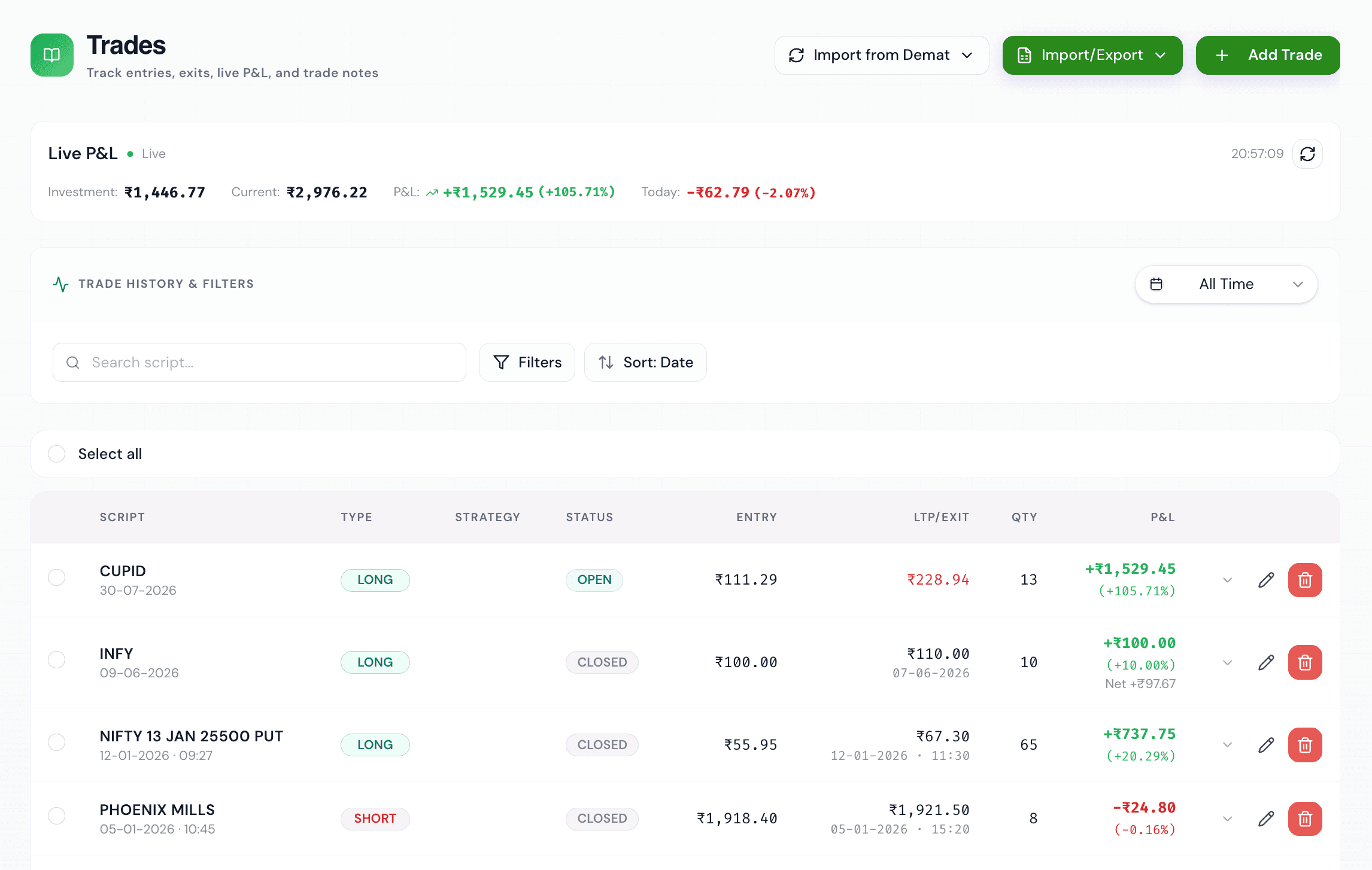
Import your Groww trades automatically
Groww brought millions of Indians into the markets, and its traders deserve better than screenshot-based journaling. WickLog connects to your Groww demat account through Groww's official API and imports your orders, trades, holdings and positions on demand.
Each sync lands in your journal as matched trades — instrument, side, quantity, entry and exit price, timestamps and P&L. F&O on Nifty and Bank Nifty, stock derivatives, intraday and delivery equity are all understood natively, with Indian lot sizes and expiries handled correctly.
Anything from before you connected, or from another broker, can be added manually or via Excel import, so your complete history lives in one place.
Set-and-forget keys
Add your API Key & Secret once — WickLog derives a fresh access token on every import, so there's no daily token refresh.
Full instrument coverage
Equity, intraday and F&O with strikes, expiries and lot sizes handled natively for NSE and BSE.
Read-only by design
WickLog can read your Groww trade history but can never place orders or touch funds.
One journal, many brokers
Connect Groww alongside Zerodha Kite and Dhan — everything merges into a single journal.
How the Groww connection works
Groww exposes its trading API through Groww Cloud. You generate an API Key and Secret from the API Keys section there, paste them into WickLog's settings once, and you're connected. On every sync, WickLog uses your keys to derive a short-lived access token and pulls your trade data — the keys themselves are encrypted, never shared and never used for anything but reading your history.
The access is read-only: no order placement, no modifications, no fund movement — ever. Disconnect any time from Settings and the credentials are deleted immediately.
From Groww history to trading edge
With your Groww trades imported, WickLog's dashboard shows you what no P&L statement can: win rate by hour and weekday, equity curve, P&L calendar, mistake patterns, streaks, and performance broken down by segment and setup.
Then ask Ticker AI about your own numbers — "what's my win rate on Bank Nifty options?", "do I overtrade after losses?" — and get answers grounded in your actual imported history, not generic trading advice.
How to connect, step by step
- 01
Create your free WickLog account
Sign up with Google — no credit card needed. Broker import is part of WickLog Pro (₹349/month or ₹2,250/year).
- 02
Generate API keys on Groww Cloud
Log in to Groww Cloud and create an API Key & Secret from the API Keys section.
- 03
Add the keys in WickLog Settings
Paste the key and secret under Settings → Broker connections → Groww. They're encrypted and used only for read-only imports.
- 04
Sync your trades
Hit Sync — WickLog derives a fresh access token automatically and imports your orders, trades and positions. No daily token maintenance.
Frequently asked questions
Does WickLog work with Groww?
Yes. WickLog connects to your Groww demat account with secure, read-only API access — generate an API Key & Secret from Groww Cloud, add them in Settings, and import your orders, trades, holdings and positions on demand.
Do I need to refresh my Groww token every day?
No. Unlike token-based connections, you add your Groww API Key & Secret once and WickLog derives a fresh access token automatically on every import.
Is it safe to give WickLog my Groww API keys?
Yes. The keys grant read-only access — WickLog can read trade history but can never place, modify or cancel orders or move funds. Keys are encrypted, never sold or shared, and deleting the connection removes them immediately.
Can I import Groww F&O trades?
Yes. Nifty and Bank Nifty options, stock F&O, intraday and delivery equity all import with strikes, expiries and lot sizes handled natively.
Is the Groww import free?
Broker import is a WickLog Pro feature (₹349/month or ₹2,250/year). The free plan includes manual entry of 50 trades a month, 50 journal entries and the full analytics dashboard.
Can I use Groww and Zerodha together in WickLog?
Yes. Pro supports multiple demat connections, so Groww, Zerodha Kite and Dhan trades all land in one unified journal.
Your Groww trades, journaled automatically
Set up once, sync forever. Connect Groww and turn your trade history into your best trading teacher.
Create your free accountFree forever plan · No credit card needed