Zerodha Kite integration
The trading journalbuilt for Zerodha Kite
Connect your Zerodha account once and every order, fill and timestamp lands in your WickLog journal automatically — intraday, equity and the full F&O segment. No CSV downloads, no spreadsheets, no manual entry.
Read-only access · OAuth via Kite Connect · 2-min setup
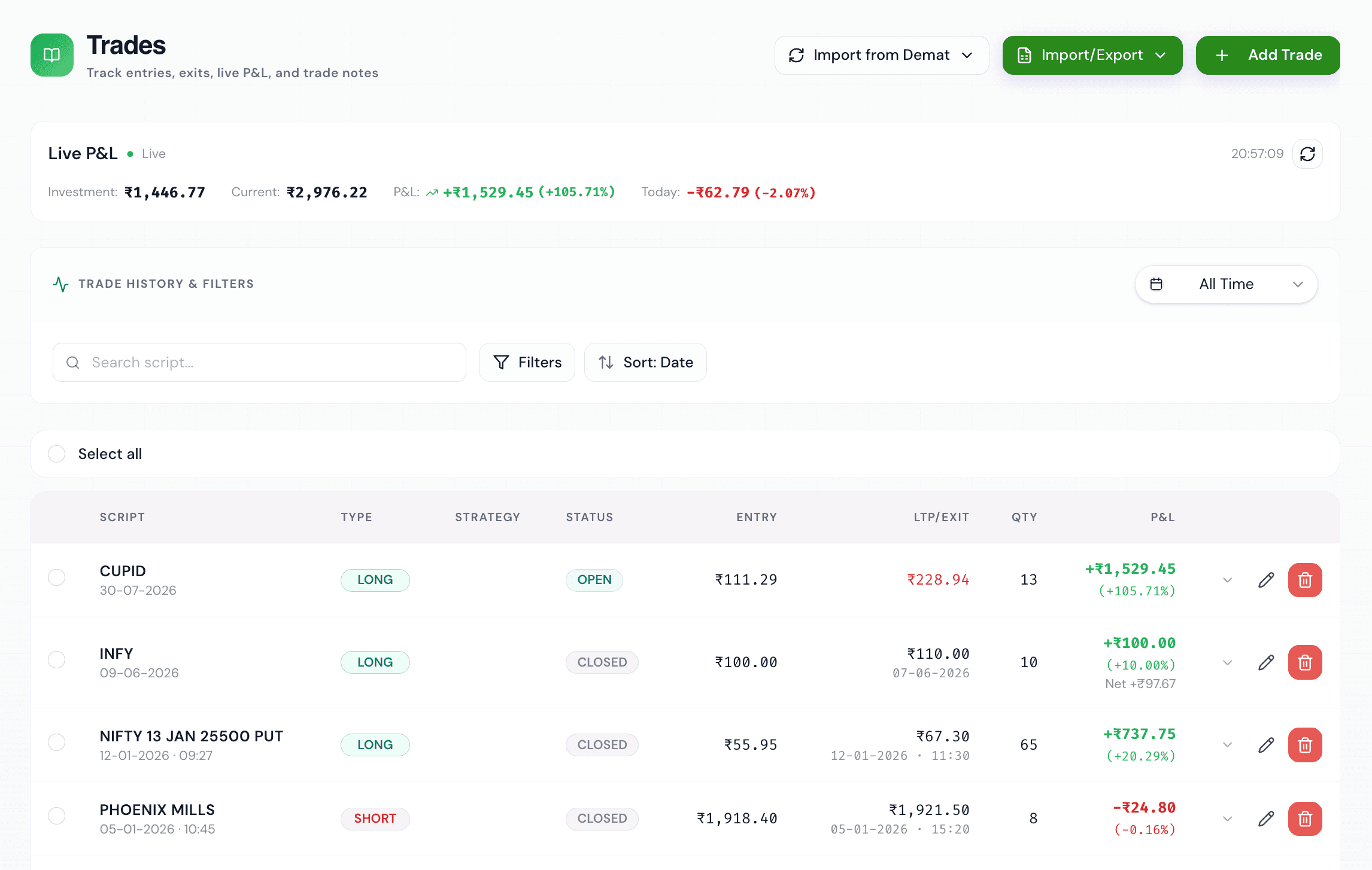
Import your Zerodha trades in one click
If you trade with Zerodha, your trade history already exists — the problem is getting it into a journal without spending Sunday evenings copying rows out of console.zerodha.com into a spreadsheet. WickLog connects directly to Kite through Zerodha's official Kite Connect API, so your journal fills itself.
Every time you sync, WickLog pulls your orders and fills straight from Zerodha: instrument, side, quantity, entry and exit price, and the exact timestamps. Options strategies on Nifty and Bank Nifty, stock F&O, intraday equity, delivery — everything lands in one place, matched into round-trip trades with P&L calculated for you.
Manual entry stays available too, so trades from before you connected (or from another broker) can live in the same journal.
Full F&O support
Nifty, Bank Nifty and stock options with strikes, expiries and lot sizes understood natively — built for Indian markets, not adapted to them.
Exact timestamps
Entries and exits carry the real execution times from Kite, unlocking time-of-day analytics like win rate by hour.
Charges included
See gross vs net P&L with brokerage and charges factored in, so you know what you actually kept.
No CSV wrangling
No tradebook downloads, no column mapping, no import errors. The API is the source of truth.
How the Kite Connect integration works
WickLog uses Zerodha's official OAuth login flow — the same Kite login screen you already trust. You sign in on Zerodha's own page and approve read-only access; your Zerodha password is never typed into WickLog and your credentials are never stored on our servers.
Read-only means exactly that: WickLog can read your trade history, but can never place, modify or cancel an order, and can never move funds. You can revoke access at any time from your Zerodha account, and disconnecting from WickLog's settings deletes the connection immediately.
From Zerodha trade log to actual insights
Importing is only the start. Once your Kite trades are in WickLog, the analytics dashboard breaks your performance down by instrument, segment, hour of day and day of week — win rate, profit factor, equity curve, P&L calendar and more.
Ticker AI, WickLog's built-in assistant, can answer questions about your own trading history: which setups actually make you money, where your losses cluster, how you perform after a losing streak. It reads your imported Zerodha trades as context, so the answers are about you, not generic advice.
How to connect, step by step
- 01
Create your free WickLog account
Sign up with Google — no credit card needed. Broker import is part of WickLog Pro (₹349/month or ₹2,250/year), and you can explore the journal free before upgrading.
- 02
Choose Zerodha in Settings → Broker connections
Click Connect and you'll be redirected to Zerodha's official Kite login page — the same screen you use every day.
- 03
Approve read-only access on Zerodha
Log in on Zerodha's page and authorise WickLog. Zerodha sends you back with a secure token; your password never touches WickLog.
- 04
Sync your trades
Hit Sync and your orders and fills import on demand — matched into trades with P&L, timestamps and charges. Re-sync any time you've traded.
Frequently asked questions
Does WickLog work with Zerodha Kite?
Yes. WickLog integrates with Zerodha through the official Kite Connect API using Zerodha's own OAuth login. Your trades import on demand with read-only access — WickLog can never place orders or see your credentials.
Is it safe to connect my Zerodha account?
Yes. You log in on Zerodha's own page, not on WickLog, and grant read-only access. WickLog never stores your Zerodha password and cannot place, modify or cancel orders or move funds. You can revoke access at any time.
Can I import my Zerodha F&O and options trades?
Yes. WickLog is built for Indian F&O traders — Nifty options, Bank Nifty options, stock futures and options, intraday and delivery equity all import with strikes, expiries and lot sizes handled natively.
Do I need to download a tradebook CSV from Zerodha Console?
No. WickLog pulls your trade history directly from the Kite API when you sync, so there are no CSV downloads, no column mapping and no copy-paste errors.
Is the Zerodha import free?
Broker import is a WickLog Pro feature (₹349/month or ₹2,250/year). The free plan includes manual trade entry (50 trades a month), the analytics dashboard and 50 journal entries a month, so you can try WickLog before upgrading.
Does WickLog support brokers other than Zerodha?
Yes — Dhan and Groww integrations are live alongside Zerodha Kite, and you can connect multiple demat accounts on Pro. Angel One and Upstox are on the roadmap.
Your Zerodha trades, journaled automatically
Connect Kite in two minutes and let your journal write itself — then find out what your trading history has been trying to tell you.
Create your free accountFree forever plan · No credit card needed